elan1 DECIDE · REVIEW CONSOLE
The unsure cases go to a person.
The Review Console is where unsure AI decisions go to a person. A reviewer sees the case and the calibrated score side by side, decides, and the decision is recorded with its route in the Decision Ledger. Cases reach the console when confidence or risk tier says a person should look.
Available now, in every elan1 Decide plan.
The case
PERSON_1 reports water entering the finished-goods store at the Hosur unit after overnight rain. Machined brackets on the lower racks are affected; a repair estimate is attached. The loss was reported two days after the event. Policy POLICY_1, fire and allied perils.
Underlined: the passages the model relied on. Personal data is redacted before the call.
The question and the model’s answer
- question
- ChoiceWhich handling path fits this first notice of loss?
- options
- fast_track | standard | investigate
- model answer
- standard
- confidence
- 0.71 · threshold 0.85
- why it is here
- Below your threshold
- explanation
- Shown beside the answer. It never feeds the route.
- queue
- claims-fnol · reviewer notified
- your answer
- typed: fast_track, standard or investigate, under your own name
- recorded in
- Decision Ledger · an action intent goes to elan1 Govern only if a change follows
- feeds back to
- Calibration Lab, as an outcome
01What it does
Decision review is not write approval.
Review answers 'What is the right answer?'. Write approval answers 'May this record change?', and that belongs to elan1 Govern. The Console handles the first question and leaves the second to Govern.
Who it's for
- Reviewers in claims and AML teams who handle the cases a model should not answer alone.
- Team leads who manage queues, backlog and turnaround.
- Risk owners who need to see who answered what.
03How it works
Six steps from an unsure answer to a recorded one.
Focus or point at a step to label the matching part of the review card.
- The Router sends a case to review: below threshold, in a recommend-only tier, on an uncalibrated schema, or unresolved by System-2.On the specimen: why it is here
- The queue scheduler places it, and the reviewer is notified.On the specimen: queue
- The reviewer sees the case, the question, the answer and its confidence. An explanation sits alongside and never feeds the route.On the specimen: the case, the question, the answer and its confidence
- The reviewer gives a typed answer, under their own name.On the specimen: your answer
- The answer goes to the Decision Ledger. If it leads to a change, an action intent goes to elan1 Govern.On the specimen: recorded in
- The review returns to the Calibration Lab as an outcome.On the specimen: feeds back to
Focus or point at a step to mark its part of the specimen.
The case
PERSON_1 reports water entering the finished-goods store at the Hosur unit after overnight rain. Machined brackets on the lower racks are affected; a repair estimate is attached. The loss was reported two days after the event. Policy POLICY_1, fire and allied perils.
Underlined: the passages the model relied on. Personal data is redacted before the call.
The question and the model’s answer
- question
- ChoiceWhich handling path fits this first notice of loss?
- options
- fast_track | standard | investigate
- model answer
- standard
- confidence
- 0.71 · threshold 0.85
- why it is here
- Below your threshold
- explanation
- Shown beside the answer. It never feeds the route.
- queue
- claims-fnol · reviewer notified
- your answer
- typed: fast_track, standard or investigate, under your own name
- recorded in
- Decision Ledger · an action intent goes to elan1 Govern only if a change follows
- feeds back to
- Calibration Lab, as an outcome
Work the queue.
Open a case, choose a typed answer and record it. Each answer goes to the Decision Ledger and back to the Calibration Lab.
Select a case to open it here: the case, the typed question, and the model's answer with its confidence.
Five cases waiting. A recorded answer leaves the queue and enters the ledger below.
Decision Ledger · newest first
| Decision | Case | Answer | Recorded | Leads to |
|---|---|---|---|---|
| No answers recorded yet. | ||||
04In the console
Review Console in the elan1 Decide console.
A screen from the elan1 Decide console design, shown as an illustrative specimen. Not customer data.
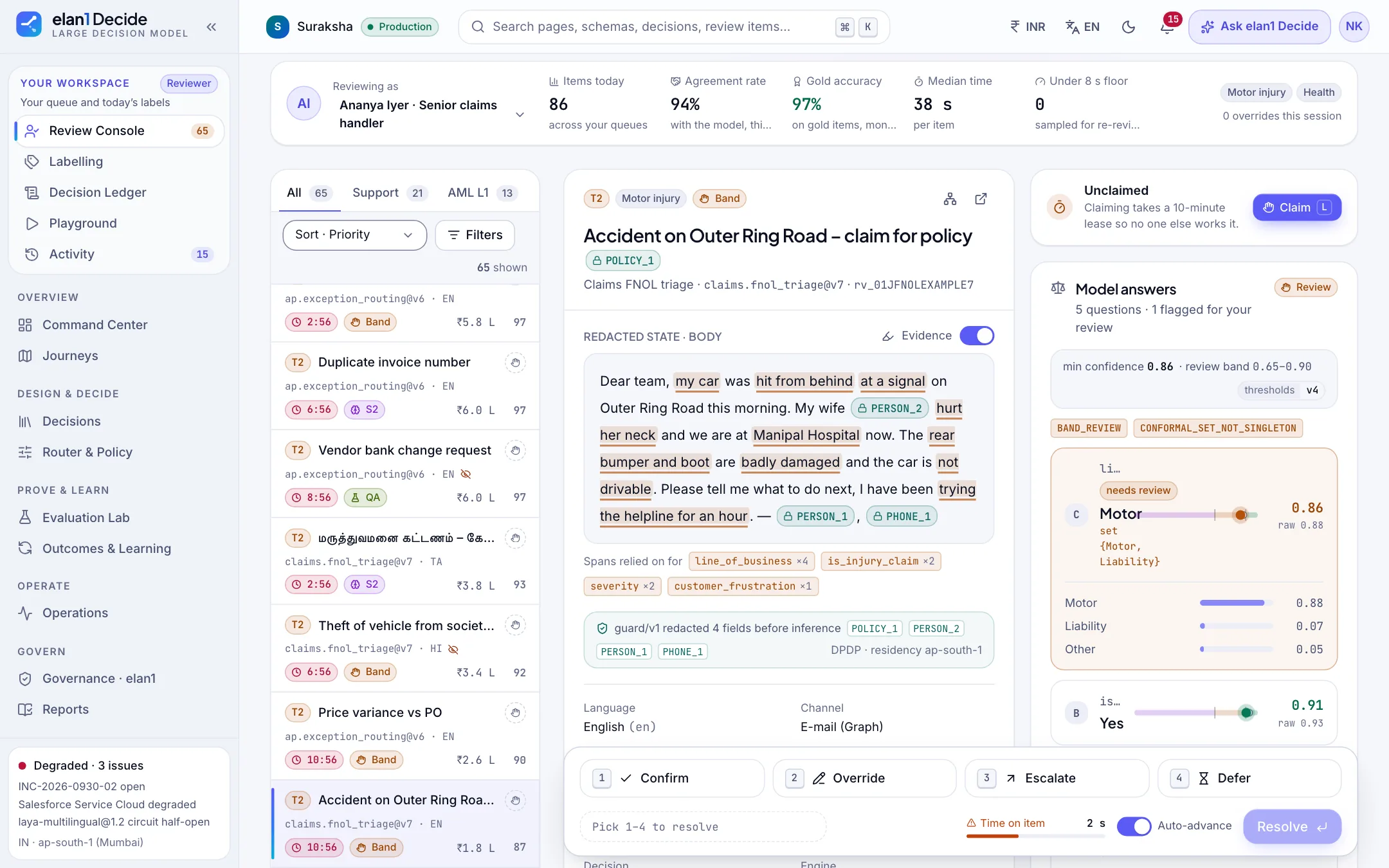
The reviewer's queue: each case arrives with its redacted text, the spans the model relied on, and the per-question answers that sent it for review.
- Personal data is redacted before inference; tokens such as PERSON_1 stand in its place.
- The reason a case is here is stated: in the review band, or no single answer.
- Confirm, Override, Escalate or Defer, with SLA timers on every item.
- Cases are claimed on a 10-minute lease so two people never work the same one.
What it connects to
Writes go through elan1 Govern.
Writes go through elan1 Govern, and your write rules apply there. Where your policy asks for it, Govern asks a named approver who is not the asker. A review answer is never that approval. Govern's decision carries one line: 'Checked and recorded by elan1 Govern.'
What it costs
Review Console is included in every elan1 Decide plan. A reviewed case is counted once, as a decision.
| What | Price · excl. GST | Includes |
|---|---|---|
| Growth — self-serve and developer teams | ₹4,80,000 per year | Typical volume 1,00,000 decisions a month |
| Mid-market | ₹36,00,000 per year | Typical volume 15,00,000 decisions a month |
| Enterprise — BFSI and insurers | ₹1,50,00,000 per year | Typical volume 1 crore decisions a month; SSO and SLA |
| Decisions beyond the plan allowance | ₹30 per 1,000 decisions | |
| A write intent Govern refuses | 40% of a governed action | Metered by elan1 Govern, not by Decide; the decision itself is counted once, as a decision |
All prices are exclusive of GST. Prices are current list prices; GST is added at the applicable rate on the invoice.
All prices are exclusive of GST. GST is added at the applicable rate on the invoice.
Status
- Available in every elan1 Decide plan.
- Governed actions in Mode B, through elan1 Govern: available.
- Each new schema runs in shadow until it reaches parity, before any route acts on its own.
- Govern records signed and checkable offline: available with L2 Attested.
Available now. See what’s next
What it does not do
- It does not approve writes.
- It does not hide the model's confidence from the reviewer.
- It does not push a waiting case to auto because the queue is long.
FAQ
Cases whose calibrated confidence falls below your threshold, cases in a risk tier where the Router only recommends, and cases on a decision that is not yet calibrated. The Router sends them to the Review Console instead of an automatic route.
The case and the calibrated score side by side, with the model's explanation shown beside the answer. The route itself depends only on the typed answer, its confidence and your threshold.
Yes. The reviewer's decision is written to the Decision Ledger with its route. If it leads to a change, the action intent goes to elan1 Govern, whose proof record carries the ledger entry's digest.
The case waits on a typed hold with a reason. It never falls through to an automatic route.
Not by itself. If it leads to a change, an action intent goes to elan1 Govern, which checks it against your rules and records it.
Next steps
Related reading
One write path, four layers
Work and Decide propose. Govern and Run assure. Only Govern allows.
// elan1 DECIDE · REVIEW CONSOLE
Bring one decision to a lighthouse.
Pick a high-volume decision. We run it in shadow beside your current process before any route goes live.