Status: Available
elan1 Work ERP
“Your agent can change your books.”
Agents draft and apply changes in ERPNext, hosted by elan1 or attached to yours. Move from Tally with a migration.
ERP in detailEnterprise Intelligence Platform
Governed agents for the work that commits your business.
elan1 Work runs governed AI agents for work that commits: ERP on ERPNext, Revenue for CRM, Commerce for storefronts and Voice for approvals by phone. Agents draft changes; nothing is written without a rule check, a named person where your rules ask, and a proof record. Indian firms can move from Tally with a migration.
01What it does
Checked and recorded by elan1 Govern.
The line every change carries.
An agent compiles a typed change. Gates built from your own books check it before anything is written. A person approves it when your rules say so. elan1 Govern makes the write and keeps the record. ERPNext comes first, then CRM and storefront. Approvals can also come in by voice.
Who it’s for
02Lines
ERPNext, CRM, voice and storefront. Each line has its own page, with its status.
“Your agent can change your books.”
Agents draft and apply changes in ERPNext, hosted by elan1 or attached to yours. Move from Tally with a migration.
ERP in detail“Governed changes in your CRM.”
Sits on top of the ERP line. Same gates, same approvals, same record.
Revenue in detail“Approve by voice.”
Approvals reach the process owner by voice, with the same proof record as the console.
Voice in detail“The storefront line.”
Same gates, same approvals, same record, for your storefront.
Commerce in detailEvery line writes through elan1 Govern. Checked and recorded by elan1 Govern.
03Key capabilities
Each capability carries its status. Nothing here is shipped.
G1 Ledger, G2 Stock, G3 Permissions, G4 GST and G8 MCA all run before any write.
Approve in the console, the CA console, through /v1, on WhatsApp or by voice.
Your CA sees what changed, who approved it and why, across every client.
Move from Tally to ERPNext.
04elan1 WORK FOR SMALL FIRMS
elan1 Work for small firms
elan1 Work for small firms is the edition for Indian small and mid-sized businesses, and your chartered accountant introduces it. Each change carries ‘Checked and recorded by elan1 Govern’. CAs can join as Introducer, Implementer or Verifier partners.
Brings the edition to the clients it fits, and stays the first call for questions about their books.
Sets up the ERP line for a client: the gates, the approvers and the autonomy each write type runs at.
Reads the proof records in the CA console: what changed, who approved it and why, across every client.
The CA’s view
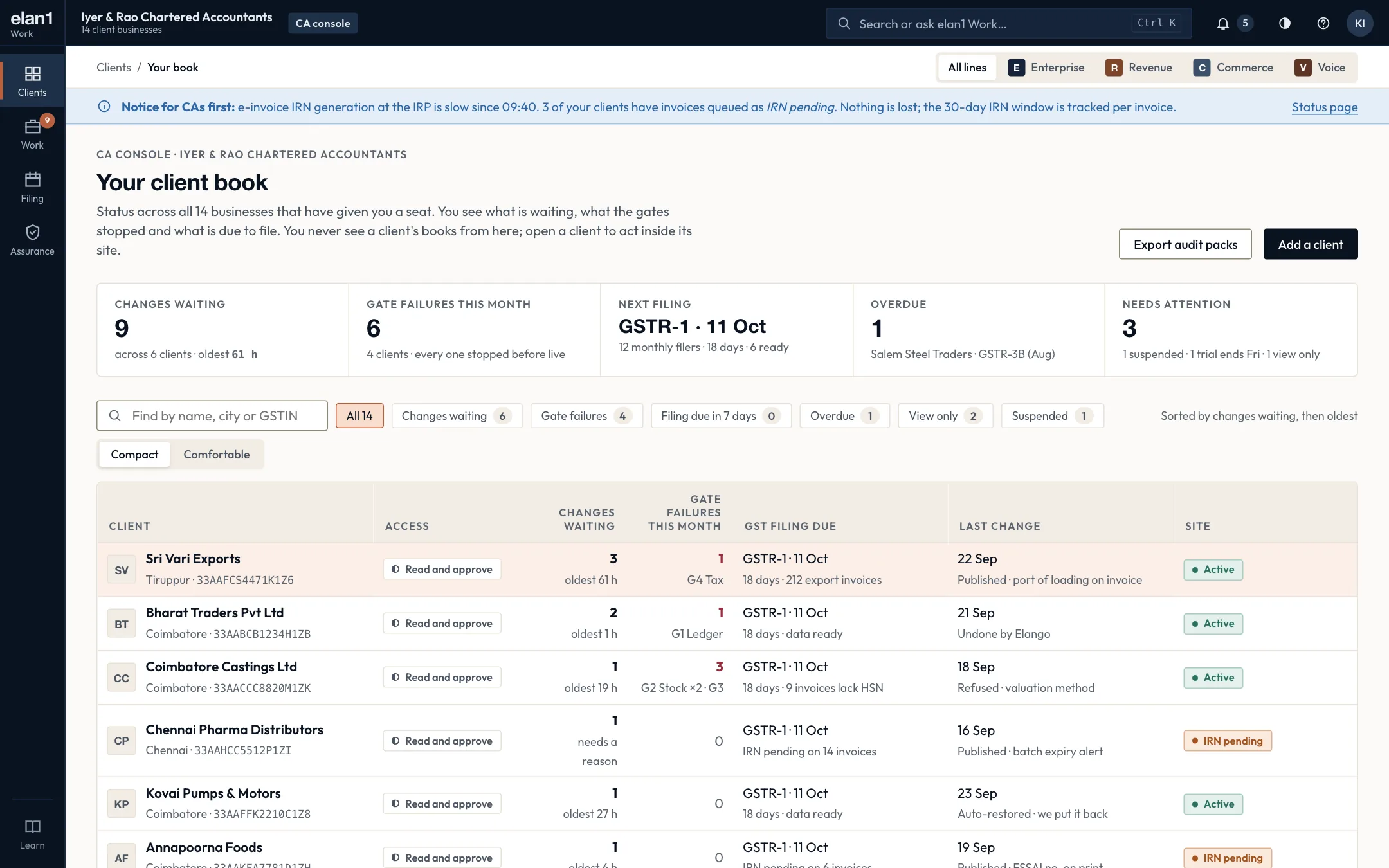
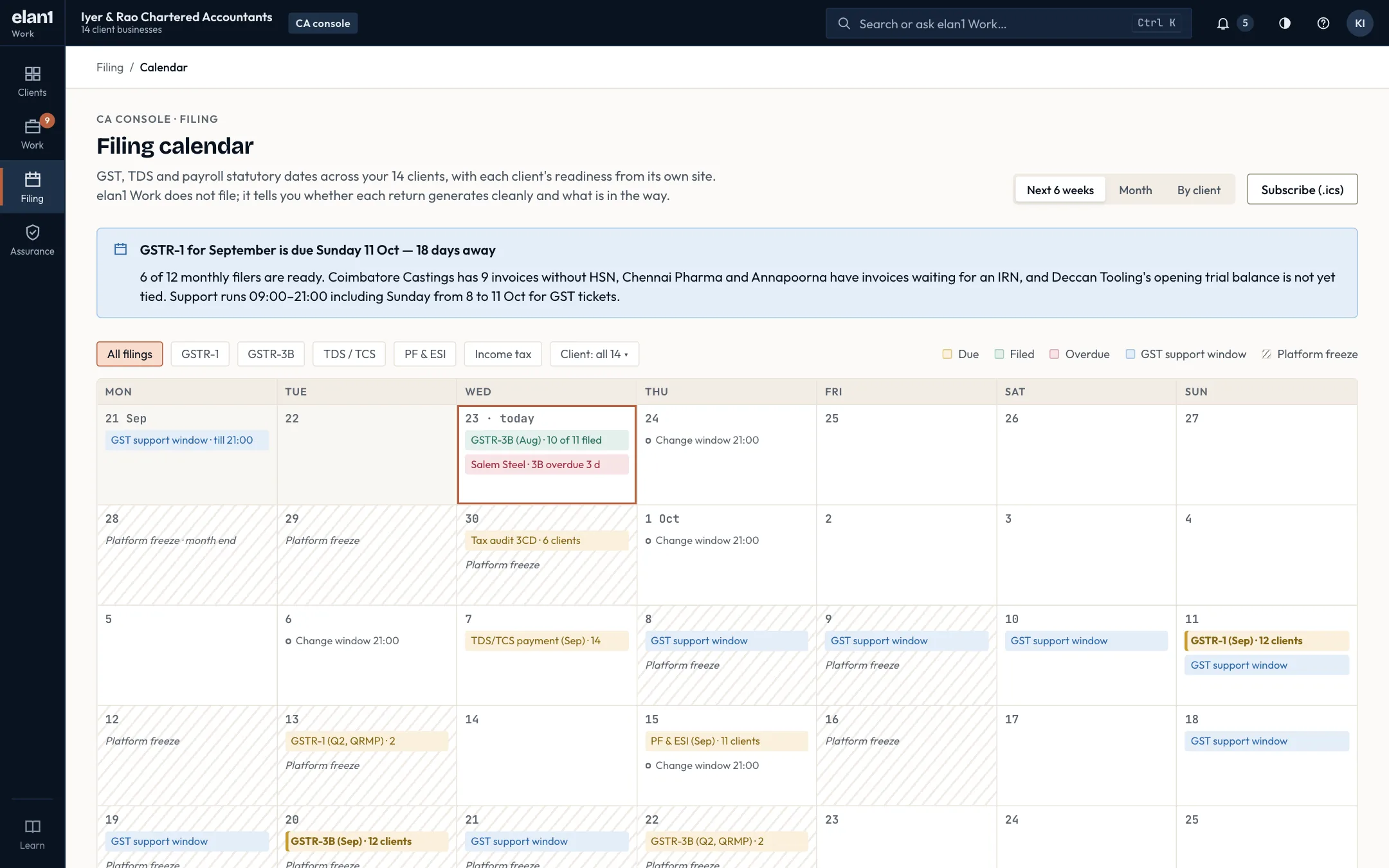
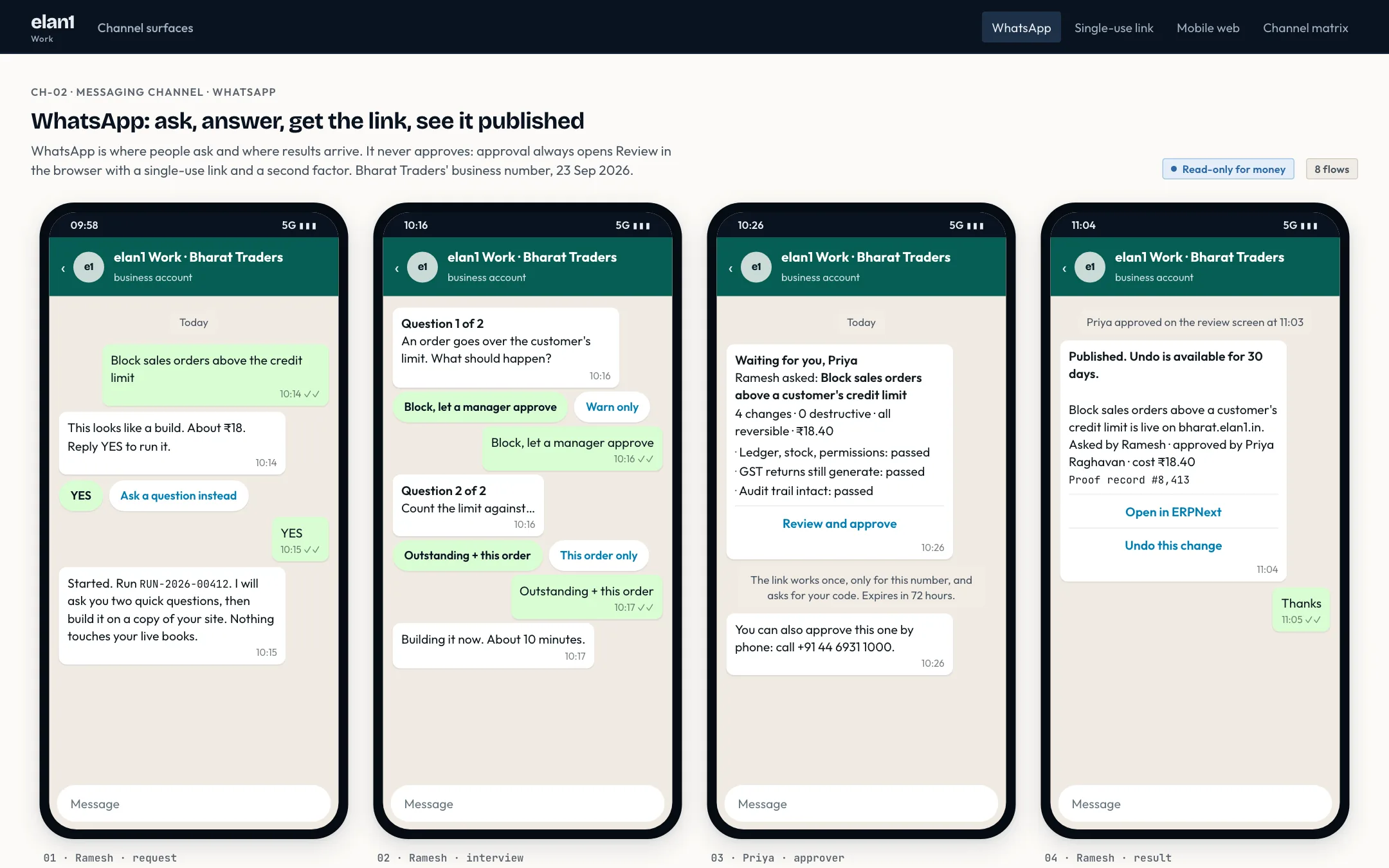
Illustrative specimen. Not customer data. Fictional sandbox data from the console.
05How it connects to elan1 Govern
Every change, and every undo, goes through KernelPort and the Right Path, and leaves its own proof record. An agent never approves its own change.
06Inside the product
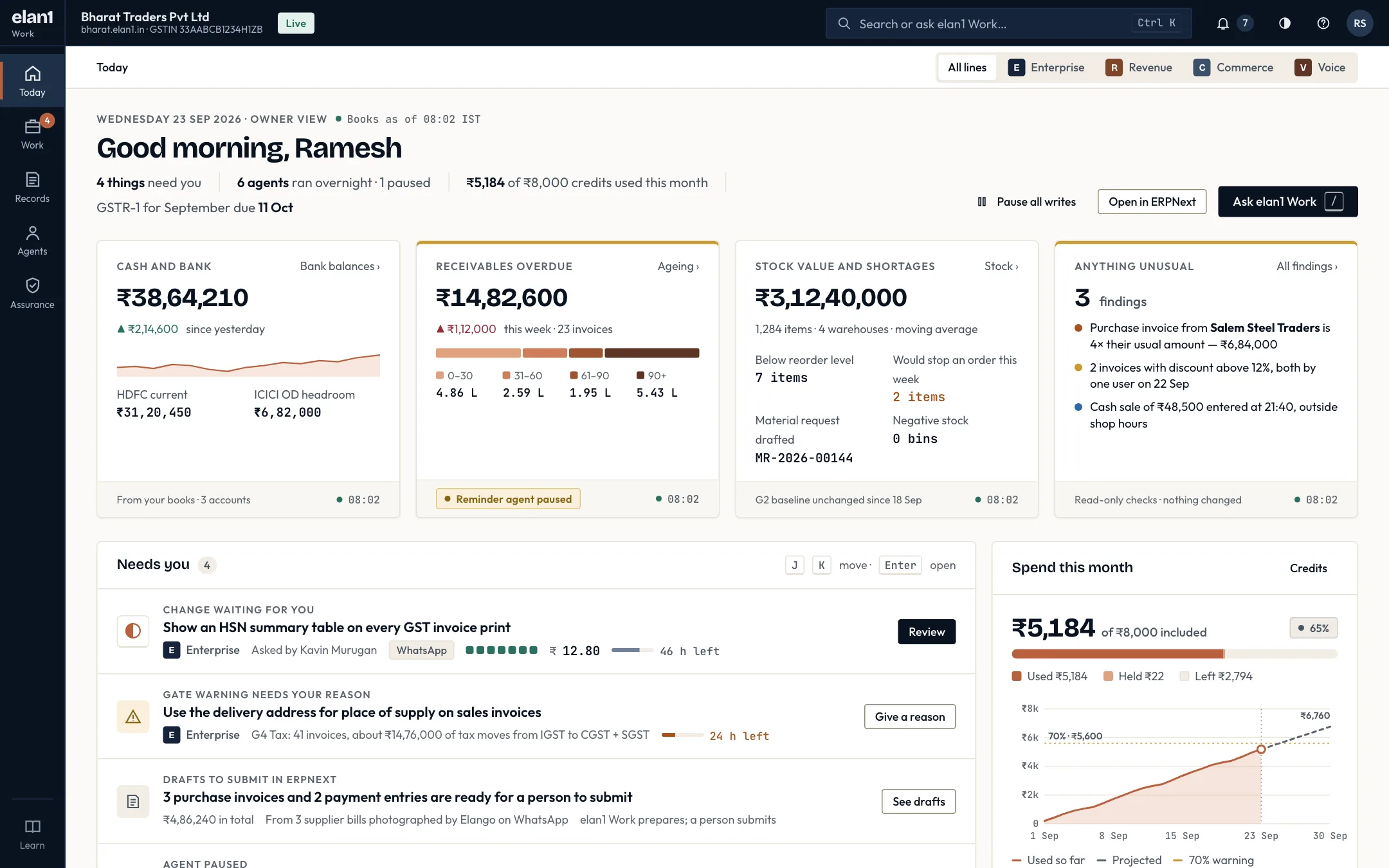
From the morning queue to an approval on WhatsApp: a change reviewed, a gate warning, a refusal, the proof records and the CA's view across clients. Choose a screen; each lists what to look for.
01 / 14 · Today
02 / 14 · Work
03 / 14 · Work
04 / 14 · Work
05 / 14 · Work
06 / 14 · Work
07 / 14 · Work
08 / 14 · Work
09 / 14 · Assurance
10 / 14 · Assurance
11 / 14 · CA console
12 / 14 · CA console
13 / 14 · Tally migration
14 / 14 · Channels
Illustrative specimen. Not customer data. Screens come from the elan1 Work console running on fictional sandbox data.
07Assurance level and mode
Available now.
L1 Guarded, with L2 Attested available. If elan1 hosts your ERPNext, Mode A applies and writes are enforced. No write reaches the system of record without a gate decision and a proof record. If you attach your own ERPNext, Mode B applies: every change is evaluated against your rules and recorded.
Govern holds the write credential. No write reaches the system of record without a gate decision and a proof record.
Your system holds the write credential. Every change is evaluated against your rules and recorded.
08Meter and pricing
The unit
One credit
A rendering of governed actions, never a separate count.
You pay a monthly turnover band plus credits. A credit is a rendering of governed actions, never a separate count, so you never pay twice for one change.
Every plan is hosted on ERPNext by elan1 (Mode A) unless you attach your own (Mode B). Each plan includes credits; a credit is a rendering of governed actions, never a separate count.
| What | Price · excl. GST | Includes |
|---|---|---|
| Sandbox — 14-day trial | ₹0 | 1 app, 3 users, 500 credits, community support |
| Nano — turnover ₹1–5 crore | ₹2,499 per month | 1 app, 5 users, 2,000 credits a month |
| Growth — turnover ₹5–20 crore | ₹7,999 per month | 3 apps, 15 users, 10,000 credits a month, L1 support |
| Scale — turnover ₹20–100 crore | ₹19,999 per month | 5 apps, 50 users, 30,000 credits a month, L2 support (24 h) |
| Enterprise — turnover above ₹100 crore | ₹49,999+ per month | Unlimited apps and users, credits by agreement, L3 support (4 h) and a DPANegotiated above the list price. |
| What | Price · excl. GST | Includes |
|---|---|---|
| Credit beyond the plan allowance | ₹0.80 per credit | |
| Credit top-up block | ₹799 per 1,000 credits | Rolls over for 90 days |
| Refused change | 0.4 of a credit | A change Govern refuses uses 0.4 of a credit (₹0.32 at ₹0.80 per credit); the credit renders Govern's charge, so nobody pays twice |
Lines add a kind of work to the same gates, approvals and record. Not offered on Nano unless stated.
| What | Price · excl. GST | Includes |
|---|---|---|
| elan1 Work Revenue — Growth | ₹4,999 per month | Governed changes in your CRM |
| elan1 Work Revenue — Scale | ₹9,999 per month | |
| elan1 Work Voice — Nano and Growth | ₹2,999 per month | Inbound approvals by voice |
| elan1 Work Voice — Scale and Enterprise | ₹5,999 per month | |
| elan1 Work Commerce — Growth | ₹5,999 per month | Storefront line |
| elan1 Work Commerce — Scale | ₹11,999 per month | |
| ONDC seller adapter (Commerce) | ₹99,999 one-time + ₹4,999 per month | Built only on a named request |
All prices are exclusive of GST. Prices are current list prices; GST is added at the applicable rate on the invoice.
09Where it is weak
Plain limits, so you can plan around them.
10Status
elan1 Work and all four lines are available.
Available now. Future improvements are listed, in order and without dates, on What’s next.
Announced 10 Oct 2026: elan1 Govern, Work, Decide and Run are available.
11FAQ
Yes, within limits you set. The agent drafts a typed change, gates such as G1 Ledger, G4 GST and G8 MCA check it against your books, and where your rules require a person, a named approver who is not the asker says yes or no. A single writer then posts the entry, and a proof record is kept.
elan1 Work runs on ERPNext, so your books move from Tally to ERPNext. The Tally → ERPNext migration costs ₹24,999 one-time and includes a dry run, a reconciliation and your CA's sign-off before go-live.
Four plans by annual turnover: Nano for ₹1–5 crore at ₹2,499 a month, Growth for ₹5–20 crore at ₹7,999, Scale for ₹20–100 crore at ₹19,999, and Enterprise above ₹100 crore from ₹49,999 a month. A 14-day Sandbox trial costs nothing. All prices are exclusive of GST.
Your CA reads every change, who approved it and why, across all clients in the CA console, and can approve changes where your rules name them. CA seats are free for every client site, always.
A credit is a rendering of governed actions, never a separate count, so you never pay twice for one change. Each plan includes a monthly allowance; credits beyond it cost ₹0.80 each. A change that Govern refuses uses 0.4 of a credit (₹0.32 at ₹0.80 per credit).
Yes, through Attach. Changes are evaluated against your rules and recorded. elan1 does not hold your write credential in that setup, so we do not say they are blocked.
Yes. An undo changes the books, so it takes the same path and leaves its own record.
Yes. elan1 Work and its four lines, ERP, Revenue, Voice and Commerce, are available now. Early adopters can also join the design-partner programme and shape what comes next.
Next steps
Related reading
One write path, four layers
Work and Decide propose. Govern and Run assure. Only Govern allows.
// elan1 WORK
Design partners run governed writes in their own books, with their CA reading the records.