elan1 DECIDE · ROUTER
Every answer goes one of four ways.
The Router is the elan1 Decide module that sends every answer one of four ways according to its risk tier and calibrated confidence: automatic, human review, a System-2 second pass, or hold. Low-confidence or high-risk answers never act alone; they reach a person in the Review Console with the case and the score.
Available now, in every elan1 Decide plan.
Diagram · illustrative specimen. Not customer data.
Review (chosen for this answer): Below your threshold, in a recommend-only tier, or on an uncalibrated schema: the case goes to the Review Console.
| Route | When it applies |
|---|---|
| Auto | Calibrated schema, a tier that may act, and confidence at or above your threshold: an action intent goes to elan1 Govern. |
| Review | Below your threshold, in a recommend-only tier, or on an uncalibrated schema: the case goes to the Review Console. |
| System-2 | Escalated for a deeper pass, held to the schema's options, then routed again. |
| Hold | Nothing can resolve it now: a typed hold with a reason code, never a fall-back to auto. |
01What it does
A model produced a number. A versioned rule decides what it permits.
The Router is deterministic and versioned. It has three risk tiers. In the highest tier it only recommends, so a person always decides. It never routes a case automatically on an uncalibrated schema.
Who it's for
- Operations owners who need cost per case and backlog down, without losing control of risky cases.
- Risk owners who must show which rule sent which case where.
03How it works
Five steps, one route, one record.
Tap, point at or focus a route in the diagram above to see its condition in one line.
- A case arrives with its schema and one calibrated System-1 answer.
- The Router checks calibration. No calibration, no automation.
- It applies the risk tier and your declared threshold.
- It picks a route. Auto: an action intent goes to elan1 Govern. Review: the case goes to the Review Console. System-2: a deeper pass, held to the schema’s options, then routed again. Hold: a typed hold with a reason code.
- It writes the route to the Decision Ledger.
Move the threshold.
Drag the threshold, or use the arrow keys. Forty illustrative cases re-route between auto, review, System-2 and hold. The diagram above shows one of them: 0.71 against 0.85.
At 0.85, calibrated answers stated at this confidence were right about 84% of the time in the Calibration Lab specimen. Illustrative.
calibrated schema uncalibrated schemaSquare colour shows the route, named in the bins below.
Auto14cases
An action intent goes to elan1 Govern
Review17cases
A person answers in the Review Console
System-26cases
A deeper pass, then routed again
Hold3cases
A typed hold with a reason code
At 0.85: 14 auto, 17 review, 6 System-2, 3 hold. Move the threshold to re-route the cases.
| Case | Tier | Confidence | Calibrated | Route |
|---|---|---|---|---|
| rt_specimen_01 | 1 | 0.99 | Yes | Auto · At or above the threshold |
| rt_specimen_02 | 2 | 0.97 | Yes | Auto · At or above the threshold |
| rt_specimen_03 | 1 | 0.96 | Yes | Auto · At or above the threshold |
| rt_specimen_04 | 2 | 0.95 | Yes | Auto · At or above the threshold |
| rt_specimen_05 | 1 | 0.94 | Yes | Auto · At or above the threshold |
| rt_specimen_06 | 2 | 0.93 | Yes | Auto · At or above the threshold |
| rt_specimen_07 | 1 | 0.92 | Yes | Auto · At or above the threshold |
| rt_specimen_08 | 2 | 0.91 | Yes | Auto · At or above the threshold |
| rt_specimen_09 | 1 | 0.90 | Yes | Auto · At or above the threshold |
| rt_specimen_10 | 2 | 0.89 | Yes | Auto · At or above the threshold |
| rt_specimen_11 | 1 | 0.88 | Yes | Auto · At or above the threshold |
| rt_specimen_12 | 2 | 0.87 | Yes | Auto · At or above the threshold |
| rt_specimen_13 | 1 | 0.86 | Yes | Auto · At or above the threshold |
| rt_specimen_14 | 2 | 0.85 | Yes | Auto · At or above the threshold |
| rt_specimen_15 | 1 | 0.84 | Yes | System-2 · Within 0.10 below the threshold |
| rt_specimen_16 | 2 | 0.83 | Yes | System-2 · Within 0.10 below the threshold |
| rt_specimen_17 | 1 | 0.81 | Yes | System-2 · Within 0.10 below the threshold |
| rt_specimen_18 | 2 | 0.80 | Yes | System-2 · Within 0.10 below the threshold |
| rt_specimen_19 | 1 | 0.78 | Yes | System-2 · Within 0.10 below the threshold |
| rt_specimen_20 | 2 | 0.76 | Yes | System-2 · Within 0.10 below the threshold |
| rt_specimen_21 | 1 | 0.73 | Yes | Review · Below the threshold |
| rt_specimen_22 | 2 | 0.71 | Yes | Review · Below the threshold |
| rt_specimen_23 | 1 | 0.70 | Yes | Review · Below the threshold |
| rt_specimen_24 | 2 | 0.68 | Yes | Review · Below the threshold |
| rt_specimen_25 | 1 | 0.64 | Yes | Review · Below the threshold |
| rt_specimen_26 | 2 | 0.61 | Yes | Review · Below the threshold |
| rt_specimen_27 | 1 | 0.57 | Yes | Review · Below the threshold |
| rt_specimen_28 | 2 | 0.52 | Yes | Review · Below the threshold |
| rt_specimen_29 | 3 · recommend only | 0.96 | Yes | Review · Tier 3: recommend only |
| rt_specimen_30 | 3 · recommend only | 0.92 | Yes | Review · Tier 3: recommend only |
| rt_specimen_31 | 3 · recommend only | 0.87 | Yes | Review · Tier 3: recommend only |
| rt_specimen_32 | 3 · recommend only | 0.79 | Yes | Review · Tier 3: recommend only |
| rt_specimen_33 | 3 · recommend only | 0.58 | Yes | Review · Tier 3: recommend only |
| rt_specimen_34 | 1 | 0.97 | No | Review · Uncalibrated schema: never auto |
| rt_specimen_35 | 2 | 0.93 | No | Review · Uncalibrated schema: never auto |
| rt_specimen_36 | 2 | 0.88 | No | Review · Uncalibrated schema: never auto |
| rt_specimen_37 | 1 | 0.66 | No | Review · Uncalibrated schema: never auto |
| rt_specimen_38 | 1 | 0.91 | Yes | Hold · Unresolved after the fall-backs · HOLD.UNRESOLVED (illustrative) |
| rt_specimen_39 | 2 | 0.78 | Yes | Hold · Unresolved after the fall-backs · HOLD.UNRESOLVED (illustrative) |
| rt_specimen_40 | 2 | 0.62 | Yes | Hold · Unresolved after the fall-backs · HOLD.UNRESOLVED (illustrative) |
Failure order
If the first model is unavailable, the Router tries a second, then System-2, then review, then a typed hold. It fails toward a person, never toward an action.
Off switch
One call turns automatic routing off for a tenant. That call is itself a governed action.
04In the console
Router in the elan1 Decide console.
A screen from the elan1 Decide console design, shown as an illustrative specimen. Not customer data.
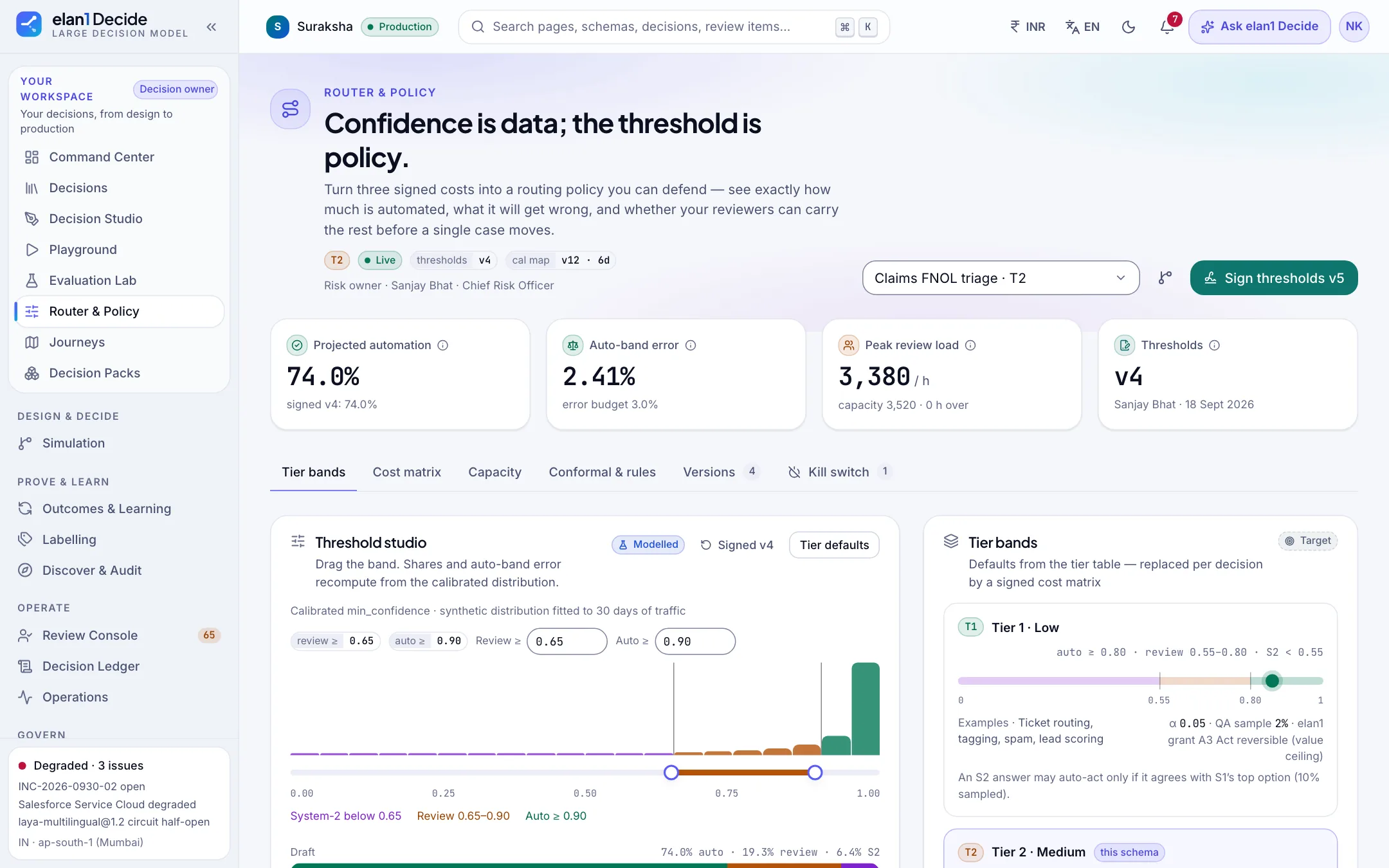
Confidence is data; the threshold is policy. Drag the review and auto bands and see projected automation, auto-band error and reviewer load before anything changes.
- Projections are labelled Modelled, separate from measured figures.
- New thresholds take effect only when the risk owner signs them.
- Tier bands set defaults; a signed cost matrix replaces them per decision.
- A kill switch sits alongside the bands, not buried in settings.
What it connects to
Writes go through elan1 Govern.
Writes go through elan1 Govern over KernelPort, in Mode B: evaluated and recorded. Govern re-checks your threshold at rung 4, with no model. If the Router and Govern disagree, Govern wins, and the disagreement is treated as a defect in Decide. Underneath, the Router runs on elan1 Run's gateway and run contracts.
What it costs
The Router is included in every elan1 Decide plan. It is also where the one pass-through applies: System-2 passes, shown on their own line.
| What | Price · excl. GST | Includes |
|---|---|---|
| Growth — self-serve and developer teams | ₹4,80,000 per year | Typical volume 1,00,000 decisions a month |
| Mid-market | ₹36,00,000 per year | Typical volume 15,00,000 decisions a month |
| Enterprise — BFSI and insurers | ₹1,50,00,000 per year | Typical volume 1 crore decisions a month; SSO and SLA |
| Decisions beyond the plan allowance | ₹30 per 1,000 decisions | |
| System-2 pass (escalated decision) | Model cost + 30% | Shown separately on the bill; about ₹1.14 per escalated decision at today's model prices |
| A write intent Govern refuses | 40% of a governed action | Metered by elan1 Govern, not by Decide; the decision itself is counted once, as a decision |
All prices are exclusive of GST. Prices are current list prices; GST is added at the applicable rate on the invoice.
- A decision is not a governed action. The writes that follow are priced by elan1 Govern and never counted again by Decide. Govern's per-action rates are on the pricing page.
All prices are exclusive of GST. GST is added at the applicable rate on the invoice.
Status
- Available in every elan1 Decide plan.
- Governed actions in Mode B, through elan1 Govern: available.
- Each new schema runs in shadow until it reaches parity, before any route acts on its own.
- Govern records signed and checkable offline: available with L2 Attested.
Available now. See what’s next
What it does not do
- It does not approve writes. Only elan1 Govern allows or refuses.
- It does not fall back to auto when something fails.
- It does not let System-2 answer outside the schema's options.
FAQ
Automatic, where an action intent goes to elan1 Govern; review, where the case goes to a person in the Review Console; System-2, a deeper pass held to the schema's options and then routed again; and hold, a typed hold with a reason code. Every route is written to the Decision Ledger.
A System-2 pass is a deeper second look at a case the Router escalates, held to the schema's options. It is passed through at model cost plus 30% and shown on its own line of the bill; at today's model prices that is about ₹1.14 per escalated decision, exclusive of GST.
You do, as versioned policy. The Router applies your threshold and the case's risk tier, and elan1 Govern re-checks it at rung 4 without a model. In the highest risk tier the Router only recommends, so a person always decides.
No. It produces an action intent. elan1 Govern evaluates it against your rules and records it.
It depends on your cases. We measure it per schema during shadow and report it to you before any route runs on its own.
Yes. Set thresholds so nothing routes automatically, or turn automatic routing off. Every route is still recorded.
Next steps
Related reading
One write path, four layers
Work and Decide propose. Govern and Run assure. Only Govern allows.
// elan1 DECIDE · ROUTER
Bring one decision to a lighthouse.
Pick a high-volume decision. We run it in shadow beside your current process before any route goes live.