elan1 WORK · ERP
Your agent can change your books.
elan1 Work ERP: governed AI agents in ERPNext, with a Tally migration
elan1 Work ERP lets an AI agent draft and apply changes in ERPNext, hosted by elan1 or attached to your own instance. Each change, such as a journal entry or purchase invoice, passes a rule check and a named approver where your rules ask, and leaves a proof record. A Tally migration includes a dry run and CA sign-off.
01What it does
A governed change layer over your ERPNext.
In plain words
Checked and recorded by elan1 Govern.
Ask in plain words: add a field, change a credit limit, fix a workflow, post an entry. An agent turns the request into a typed change and tries it on a copy of your site first. Checks built from your own books run before anything is written. elan1 Govern decides whether the change may happen. Where your rules ask, a named person approves. Then one writer applies the change to your live site, and Govern writes the record.
- Changes in ERPNext. Fields, scripts, workflows, permissions, masters and entries.
- Checks from your books. Ledger, stock, permissions, GST and the MCA audit trail are checked before any write.
- Approvals where you work. In the console, the CA console, through /v1 or on WhatsApp.
- Undo. An undo changes the books, so it takes the same path and leaves its own record.
- Tally → ERPNext migration. Move your books across, with the trial balance checked before you go live.
02Who it's for
Firms whose books have to stand up.
- Owners and finance heads of Indian firms with ₹5–50 crore turnover.
- Firms on Tally, or with an ERPNext project that stalled.
- Firms that face the MCA audit-trail requirement or e-invoicing.
- Chartered accountants, who introduce, implement or verify for their clients.
03How it works
Seven steps. Any of them can stop the change.
The same path for every change and every undo, from your request to the record.
- 01
Ask
You ask in plain words, in the console or on WhatsApp.
- 02
Draft
An agent drafts a typed change. A model helps write it. It never decides whether the change may happen.
- 03
Rehearse
The change is applied to a copy of your site, and the checks run there first.
- 04
Check
elan1 Govern runs its gates and your versioned rules, with no model. A refusal comes back with a reason you can read.
- 05
Approve
If your rules ask for a person, a named approver who is not the asker sees what will change, the check results and the rule version.
- 06
Apply
One writer, holding a single-use credential that lasts 10 minutes, applies the same change to your live site.
- 07
Record
Govern writes a 16-field proof record and counts one governed action. A refusal writes a record too, metered at 0.4 of a governed action.
One change, and the record it left
| Account | Debit (₹) | Credit (₹) |
|---|---|---|
| Freight Inward - KC* | 18,400.00 | — |
| Freight Payable - KC* | — | 18,400.00 |
| Total | 18,400.00 | 18,400.00 |
- LedgerPassed
- StockNot affected
- PermissionsPassed
- GSTPassed
- MCA audit trailPassed
- Rules
- decl_month_end_close · v7
- Autonomy
- A2 Propose
- Approver
- usr_specimen_approver (named, not the asker)
- Writer
- one writer · single-use credential · 10 min
- F01tenant_id
- tnt_specimen_01
- F02seq
- 1042
- F03prev_digest
- sha256:9f3c…e41a
- F04write_id
- wr_specimen_7c2
- F05write_type
- journal_entry.post
- F06declaration_id
- decl_month_end_close
- F07declaration_version
- 7
- F08policy_version
- 2027.06.1
- F09actor_id
- usr_specimen_approver
- F10actor_kind
- human
- F11autonomy_level
- A2
- F12record_id
- je_specimen_5531
- F13record_version
- 2
- F14payload_hash
- sha256:51b0…7d9a
- F15lexicon_hash
- sha256:e2c4…0b16
- F16recorded_at
- 2027-07-14T10:42:07+05:30
Try the GST check on a purchase invoice
Hex bolts and nuts, M10 (HSN 7318)
| Line | Amount (₹) |
|---|---|
| Taxable value · 20,000 pcs × ₹20 | 4,00,000 |
| CGST 6% | 24,000 |
| SGST 6% | 24,000 |
| Invoice total | 4,48,000 |
| The bill’s total | 4,72,000 |
- G1 LedgerPassedchanged
Debits equal credits: purchases and input GST against the supplier.
- G3 PermissionsPassedchanged
agt_specimen_ap01 may draft purchase_invoice.post.
- G4 GSTFailedchanged
Rate 12% does not match the bill (18%) or HSN 7318 in your item master (18%).
- RateFailedchanged
- HSNPassedchanged
- Tax typePassedchanged
- TotalFailedchanged
₹4,48,000 does not tie to the bill (₹4,72,000) within ₹1.
- G8 MCA audit trailPassedchanged
The edit log is on and cannot be disabled.
Illustrative specimen. Not customer data. *Fictional company; all data is illustrative.
Gate names are the accounting pack’s. Codes are illustrative. A refused change uses 0.4 of a credit.
04In the console
The change, the checks and the migration.
Screens from the elan1 Work console that match this line: reviewing one change, the checks running on a copy of the site, the step-up before an approval, the record trail and the Tally tie-out.
01 / 05 · Work
Change review
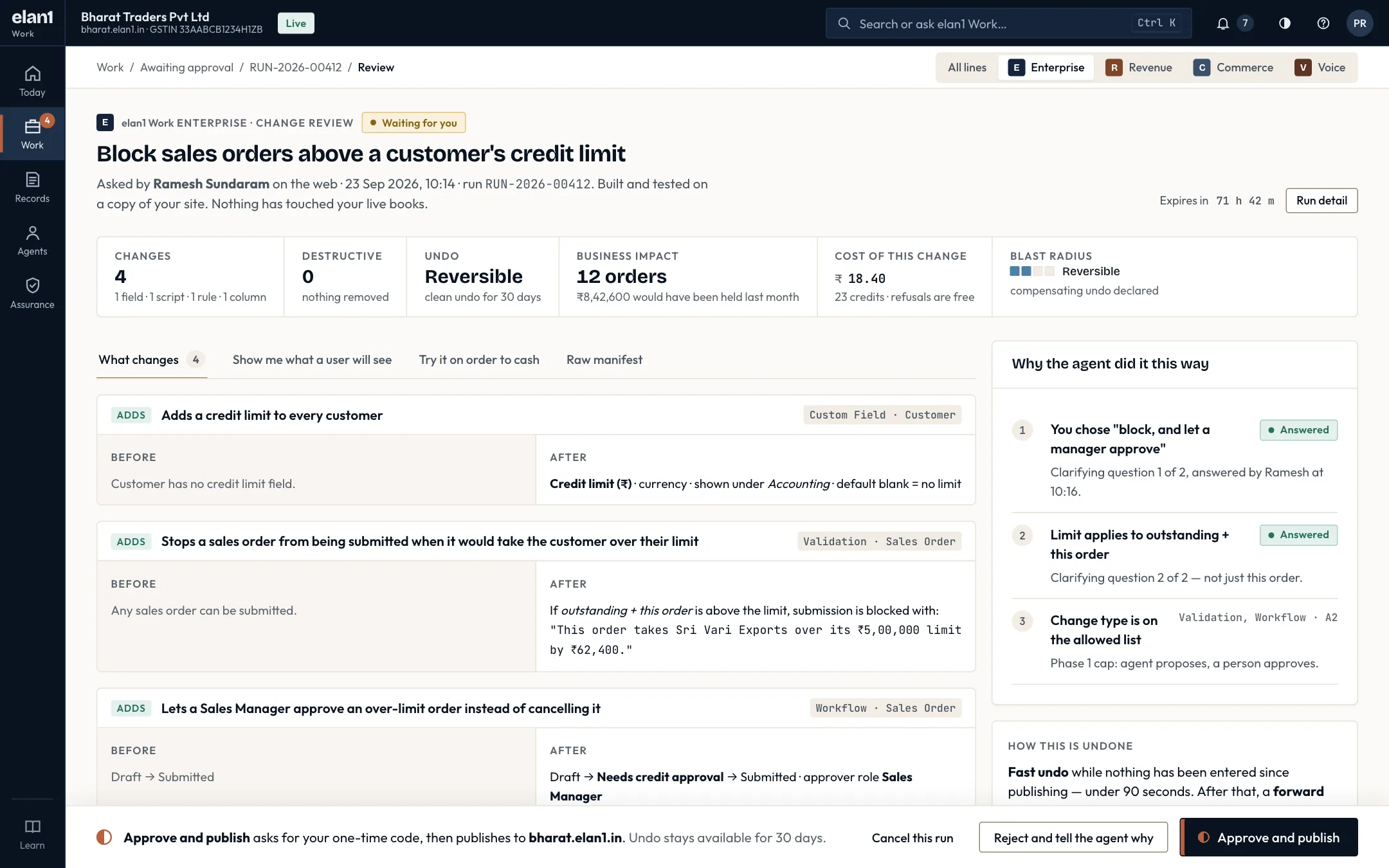
- The summary row gives changes, destructive steps, undo window, business impact and cost at a glance.
- Every change is shown before and after, with the exact message a user will see.
- 'Why the agent did it this way' lists the questions it asked and the answers it was given.
- Approving asks for a one-time code; rejecting asks you to tell the agent why.
02 / 05 · Work
Gate check, live
- Every check is written from the company's own data; none of them uses a model or a guess.
- Blocking checks stop at the first failure, so a broken ledger never reaches approval.
- The tax check confirms GST returns still generate and no filed period is touched.
- The banner makes clear this is a copy; nothing on this screen touches the live site.
03 / 05 · Work
Confirm it is you
- A single-use code by SMS or WhatsApp, or a registered passkey.
- The summary repeats what is being approved: changes, gates passed, cost and undo window.
- Asked by one person, approved by another, and both names are recorded.
04 / 05 · Assurance
Proof records
- The chain is checked every night, and the result is shown at the top of the page.
- Refusals sit alongside commits; they count as evidence.
- Each row shows who decided, through which channel, the gate results and the cost.
- Refusal rate and cost per change are shown side by side, always.
05 / 05 · Tally migration
Tally migration: trial-balance tie-out
- Debits, credits, every mapped account, receivables, payables and stock are compared line by line.
- Go-live is held because three accounts differ; there is no override in any plan.
- Each difference names the mapping row responsible and says what would fix it.
Illustrative specimen. Not customer data. Screens come from the elan1 Work console running on fictional sandbox data.
05What it connects to
Work proposes. Govern allows.
Every change and every undo goes through elan1 Govern on the Right Path, and leaves its own proof record. elan1 Run carries the work under contract and never decides. An agent never approves its own change.
| Your setup | Mode | What we may say |
|---|---|---|
| elan1 hosts your ERPNext | Mode A · Enforced | “No write reaches the system of record without a gate decision and a proof record.” |
| Attach: you run ERPNext | Mode B · Attested advisory | “Evaluated against your rules and recorded.” |
06Pricing
A turnover band plus credits. Never per seat.
| What | Price · excl. GST | Includes |
|---|---|---|
| Sandbox — 14-day trial | ₹0 | 1 app, 3 users, 500 credits, community support |
| Nano — turnover ₹1–5 crore | ₹2,499 per month | 1 app, 5 users, 2,000 credits a month |
| Growth — turnover ₹5–20 crore | ₹7,999 per month | 3 apps, 15 users, 10,000 credits a month, L1 support |
| Scale — turnover ₹20–100 crore | ₹19,999 per month | 5 apps, 50 users, 30,000 credits a month, L2 support (24 h) |
| Enterprise — turnover above ₹100 crore | ₹49,999+ per month | Unlimited apps and users, credits by agreement, L3 support (4 h) and a DPANegotiated above the list price. |
| Credit beyond the plan allowance | ₹0.80 per credit | |
| Credit top-up block | ₹799 per 1,000 credits | Rolls over for 90 days |
| Compliance filing pack | ₹1,999 per month | GSTR-1 and 3B preparation, 2B reconciliation, e-invoice monitoring |
| Additional catalogue app | ₹1,499 per month | Beyond the plan's app allowance |
| Tally → ERPNext migration | ₹24,999 one-time | Same price hosted or attached; dry run, reconciliation, CA sign-off |
| Attach onboarding | ₹19,999 one-time | Refunded if the readiness check fails |
| Attach surcharge — Growth | ₹3,000 per month | On top of the plan. Never sold on Nano |
| Attach surcharge — Scale | ₹6,000 per month | On top of the plan |
| Attach surcharge — Enterprise | By agreement | |
| Refused change | 0.4 of a credit | A change Govern refuses uses 0.4 of a credit (₹0.32 at ₹0.80 per credit); the credit renders Govern's charge, so nobody pays twice |
All prices are exclusive of GST. Prices are current list prices; GST is added at the applicable rate on the invoice.
A monthly plan by turnover band, with credits included; credits beyond the allowance are billed per credit. A credit is a rendering of governed actions, never a separate count, so you never pay twice for one change. A change that Govern refuses uses 0.4 of a credit (₹0.32 at ₹0.80 per credit). There is no pass-through, and no per-seat price: CA seats are free, always.
All prices are exclusive of GST. GST is added at the applicable rate on the invoice.
07Status
Available now.
elan1 Work ERP is available, hosted or attached.
- Hostedelan1 hosts your ERPNext, in Mode A.
- AttachYour own ERPNext, in Mode B.
- MigrationTally → ERPNext, tied out to the trial balance.
- Lineselan1 Work Revenue, Voice and Commerce sit on top.
08Limits
What it does not do.
Plain limits, so you can plan around them.
- It does not write to Tally. Tally users move to ERPNext with a migration.
- It does not let a model approve a change. A model may produce a write intent. It may never produce an allow.
- With Attach, elan1 does not hold your write credential, so we never say a change was blocked. It is evaluated against your rules and recorded.
- It does not sign records at L1. At L1 the record is tamper-evident to you. Signing comes with L2 Attested.
- It does not charge per seat, and it does not charge a refusal at the full rate.
09FAQ
Direct answers.
Yes. elan1 Work ERP is available, hosted by elan1 (Mode A) or attached to your own ERPNext (Mode B).
Yes, within the autonomy level you declare. By default agents stop at A2 Propose, so every journal entry waits for a named person, and gates built from your books, including ledger, GST and MCA audit trail checks, run before anything is written. One writer then posts the entry, and elan1 Govern keeps a proof record.
We move your masters and balances from Tally to ERPNext, run a dry run, and reconcile until the trial balance in ERPNext ties to the one in Tally; your CA signs off before you go live. It costs ₹24,999 one-time, the same whether ERPNext is hosted by elan1 or attached, exclusive of GST.
The MCA rule asks that accounting software keep an edit log of every change that cannot be disabled. Your ERPNext edit log stays as it is, and every change an agent makes through elan1 Work also passes the G8 MCA gate and leaves a proof record naming who acted and under which rules, a second, linked record your auditor can read.
Yes, through Attach (Mode B). Changes are evaluated against your rules and recorded, but elan1 does not hold your write credential in that setup, so we do not say they are blocked. Attach onboarding is ₹19,999 one-time, refunded if the readiness check fails.
Yes, with the compliance filing pack at ₹1,999 a month: GSTR-1 and 3B preparation, 2B reconciliation and e-invoice monitoring. Any change the pack makes to your books takes the same gates and leaves a proof record.
Plans are set by turnover band: Nano ₹2,499, Growth ₹7,999, Scale ₹19,999 and Enterprise from ₹49,999 a month, each with a credit allowance; extra credits cost ₹0.80 each. The Tally migration is ₹24,999 one-time. A change that Govern refuses uses 0.4 of a credit. Prices exclude GST.
Yes. Every change has a proof record, and the CA console shows them across clients.
Next steps
One write path, four layers
Work and Decide propose. Govern and Run assure. Only Govern allows.
// elan1 WORK ERP
Put one change through the gates.
Run governed writes in your own books, with your CA reading the records.